
Skip to content

JOBPLAN · MORE CLARITY. LESS STRESS.

Job scheduling with customer details and work photos

From the first instruction to completed work: keep job planning and execution in one place.

No payment details required

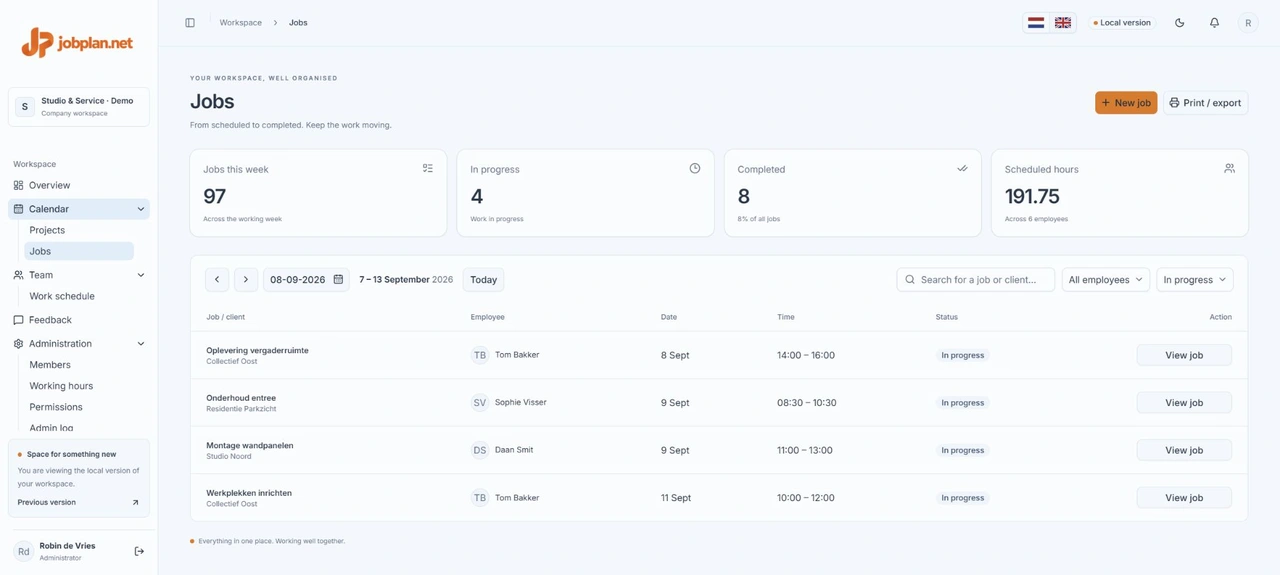
A clear view of your work
Jobplan job overview showing scheduled work and statuses with sample data
A look inside Jobplan. Screens show sample data.

Give the worker the right information

Add the customer, location, contact person and work instructions to a job. Special instructions stay with the scheduled work.

Track execution and results

Team members can start and complete jobs. Work notes and photos help record details and results. Access and available actions depend on configured permissions.

Separate references from work photos

Keep supplied information with the job and add execution photos in the work photos section. This keeps instructions and results distinct.

IN PRACTICE

Turn a request into a clear job

Create a job with a recognisable title, such as a maintenance visit. Add the location, contact person and instructions, then select an employee, date and time. Make special instructions specific: where should the worker report and what result does the customer expect? Include only personal information needed for the job.

Record details on site

The worker opens the job and reviews the available customer information and instructions. A work note can explain what was done or why something could not be completed. Add a work photo where useful. Agree internally what may be photographed, especially people or confidential information.

When is the job finished?

Start the job when work begins and mark it complete when finished. First check that notes and required photos have been added. Status gives the team an overview; separately agree on inspection, approval and follow-up work.

A PLAN FOR YOUR WHOLE TEAM

Make room for good work.

Try free for 14 days